How article creation works in Pageloop
From blank page to published article, in under five minutes.

Writing a help center article used to start from a blank page. AI drafting tools have made the job easier, but as they cannot see your product, the draft still has to be rewritten against the real thing. Pageloop closes that gap. It connects to your help center, learns your writing style, and generates articles from your product notes or a recorded flow through your product. The full flow, from blank page to published article, takes under five minutes.
Writing a help center article used to be one of the slowest parts of support work. You pulled context together from wherever it lived, worked out the structure yourself, and checked every step against the product before publishing. On a good day it took an afternoon.
Today, LLMs have made this job much easier. Paste a prompt, get a draft, edit from there. The first part of the work got faster.
The limits, however, have also started to show up quickly. We covered this in How to Use AI to keep your Help Center updated, and the short version is that AI drafting tools have no visibility into your actual product. They generate a draft that reads fluently but gets product-specific details wrong, because the model does not know your feature names or your menu paths. The editing pass takes back most of the time the draft saved.
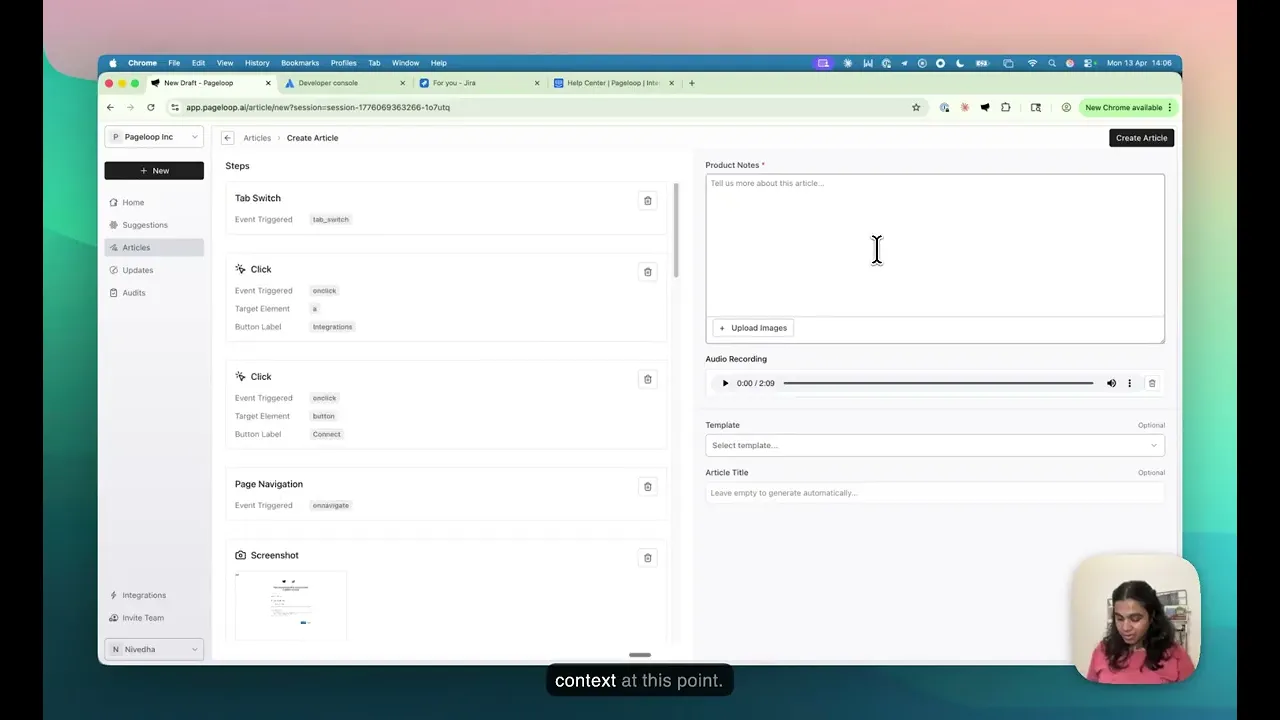
Pageloop is built for the gap between those two experiences. Nivedha recorded a full walkthrough of article creation, from the first click to a published article.
Setting Pageloop up for your help center
Pageloop connects directly to your help center, so it has access to every article you have already written. When you set the app up, you can go further and tailor it to how your team writes. Share a handful of articles that represent your preferred voice and structure, and Pageloop uses them as the reference for every draft it produces. If you do not have a formal style guide, that is fine. We ship with an AI-friendly default style guide built on Google’s documentation guidelines, and it uses that instead.
You can also give Pageloop a list of product-specific vocabulary. Feature names, internal terms, anything the app should treat as intentional instead of flagging as a typo. The more it knows about how your team writes and what your product is called, the closer the first draft lands to something you would publish.
Three ways to create an article
The first way is to paste in your product notes. A PRD works. So does a Slack blurb from the PM, a Linear ticket, or release notes. Pageloop uses whatever context you already have as the input for the draft, and because the input is specific to your product, the output is too.
The second way is to record a flow. Install the Pageloop Chrome extension and hit record, then click through your product the way a customer would. You can narrate as you go if you want to add spoken context, or stay silent and let the clicks speak for themselves. The extension captures the flow and the screenshots. Pageloop generates the article from the recording.
The third way is autonomous capture. Grant Pageloop permission to access your product and it opens the relevant screens and captures the screenshots on its own, without a recording session. This works best for straightforward feature pages where the flow is predictable and you do not need narrated context.
The output is good enough that most teams barely edit. A final read-through, a minor tweak where it is needed, and the article is live in your help center.
Why this closes the gap
The usual AI drafting workflow assumes you can describe your product well enough in a prompt that the model produces something usable. In practice, most teams cannot. The prompt always leaves context out, and the model fills those gaps with guesses.
Pageloop removes that step. It is working from your product and your existing help center, not from a prompt and vague guesses. Every article it produces is written to be read by humans and retrieved by AI. FAQ sections are included where they make sense. Structure is clear enough that a chatbot can pull the right answer without stripping context out, and clear enough that a person can skim the page and find what they need.
For the team writing the article, this is the difference between finishing the work and restarting it. Less time rewriting the draft to match reality. More time on the parts of the article that actually need human judgment.
What’s next in the series
This is the first walkthrough in a series on how to use Pageloop day to day. The next videos will cover updates, which is how Pageloop keeps articles current when the product changes, and audits, which finds broken links and conflicts across your help center.
Try Pageloop, and subscribe on YouTube for the rest of the series!
Image courtesy Unsplash & Europeana
Park with Blooming Lilac at Bellin, 1902. Adelaide Hann von Weyhern (German, 1840–1919).

Author
Fatema works across marketing and content at Pageloop. She has an academic background in Ecology, a side-life in fashion, and an irrational loyalty to milk coffee.
Other related content you might be interested in


