Ship product docs
that never go stale
Pageloop watches what your product ships and keeps your docs and screenshots accurate.






Slack
#product-update
Need a unified cloud cost breakdown.






James David
Slack
#product-update
Need a unified cloud cost breakdown.
James David

Managing Projects and Roadmaps
Management
Projects
+1
0/9
User Roles and Permissions Explained
Administration
Workspace
+2
0/6
Project Notifications and Alerts
Notifications
Collaboration
3/6
Dashboard Overview and Analytics
Getting Started
Dashboard
2/10
Activity Logs and Version History
Administration
Security
+3
2/4
Understanding Roles based Configuration
Roles
Workspace
+1
3/3
Using Automations to Streamline Workflows
Automations
Workflows
+2
5/5
Creating and Tracking Cross-Team Initiatives
Collaboration
Projects
+1
6/6
Planning for Future Enhancements
Strategy
Vision
+1
8/8
Review articles to update based on product changes
Review articles to update based on product changes
Convert signals into clear documentation tasks.
Convert signals into clear documentation tasks.
See precise text and structure updates.
See precise text and structure updates.
Update screenshots with current UI.
Update screenshots with current UI.
Review once. Sync everywhere.
Review once. Sync everywhere.
Managing Projects and Roadmaps
Management
Projects
+1
0/9
User Roles and Permissions Explained
Administration
Workspace
+2
0/6
Project Notifications and Alerts
Notifications
Collaboration
3/6
Dashboard Overview and Analytics
Getting Started
Dashboard
2/10
Activity Logs and Version History
Administration
Security
+3
2/4
Understanding Roles based Configuration
Roles
Workspace
+1
3/3
Using Automations to Streamline Workflows
Automations
Workflows
+2
5/5
Creating and Tracking Cross-Team Initiatives
Collaboration
Projects
+1
6/6
Planning for Future Enhancements
Strategy
Vision
+1
8/8
Review articles to update based on product changes
Review articles to update based on product changes
Convert signals into clear documentation tasks.
Convert signals into clear documentation tasks.
See precise text and structure updates.
See precise text and structure updates.
Update screenshots with current UI.
Update screenshots with current UI.
Review once. Sync everywhere.
Review once. Sync everywhere.
Keep Scrolling
TRUSTED BY TOP SUPPORT TEAMS
Support Teams
Managing Help Centers with Pageloop








Having a system that I can trust to look through everything
before I decide what needs to change is huge!

Support Operations
I would have been on Intercom all day searching.
I’m a completionist, so I always wonder
if I missed something.
Having a system that I can trust
to look through everything before I decide
what needs to change is huge!
Support Operations
FIND
Documentation Gaps identified
as your product changes
Outdated articles, screenshots, gaps, and missing or incomplete documentation are proactively surfaced instead of waiting for unresolved support tickets. Stop documentation debt before it compounds.

Slack
#product-update
Zendesk
Ticket #48392
Freshdesk
Support Request Billing & Usage
Github
Pull Request #15287 (Merged)
Gitlab
Release v2.14.0
Linear
Issue ENG-324 (Shipped)
Slack
#product-update
Intercom
Ticket #48392
Freshdesk
Support Request Billing & Usage
Github
Pull Request #15287 (Merged)
Gitlab
Release v2.14.0
Linear
Issue ENG-324 (Shipped)
Pageloop
APP
12:45
👋 Hi Ashley
7 articles need review
Publishing workflow & UI changes detected
Why this was flagged
• 4 support tickets reference confusion
• 2 Slack threads mention outdated steps
👉 Review impacted articles
Message #documentation- team
Impacted articles surfaced
Keyword searches can only catch some articles. Potentially outdated articles are surfaced based on your Product Requirement Documents or Release Notes
Impacted screenshots identified
Rapid UI changes make screenshots stale. See what’s outdated, pick a replacement from the suggested screenshot, or upload your own.
Proactive signals captured
Doc updates from Support tickets, Slack, Linear/Jira, or GitHub, proactively consolidated into articles to create or update, notified via Slack!

Articles to Update
Managing Projects and Roadmaps
Management
Projects
+2
1/5
User Roles and Permissions Explained
Administration
Workspace
+1
1/3
Project Notifications and Alerts
Notifications
Collaboration
+1
2/4
Understanding Roles based Configuration
Roles
Workspace
+1
6/6
Planning for Future Enhancements
Strategy
Vision
+2
2/2
Creating and Tracking Cross-Team Initiatives
Collaboration
Projects
+3
0/9
Impacted articles surfaced
Keyword searches can only catch some articles. Potentially outdated articles are surfaced based on your Product Requirement Documents or Release Notes
Impacted screenshots identified
Rapid UI changes make screenshots stale. See what’s outdated, pick a replacement from the suggested screenshot, or upload your own.
Proactive signals captured
Doc updates from Support tickets, Slack, Linear/Jira, or GitHub, proactively consolidated into articles to create or update, notified via Slack!

Articles to Update
Managing Projects and Roadmaps
Analysis
Evaluation
+2
1/5
User Roles and Permissions Explained
Research
Design
+1
1/3
Project Notifications and Alerts
Engagement
Review
+1
2/4
Understanding Roles based Configuration
Wrap-up
Completion
+1
6/6
Planning for Future Enhancements
Strategy
Vision
+2
2/2
Planning for Future Enhancements
Development
Execution
+3
0/9
Find articles that need to be updated
Product changes and customer signals surface the exact articles affected, so you don’t have to search across your help center

New UI change detected
"Sidebar navigation structure has changed"
40 Articles are impacted
"Navigation screenshots no longer match the current UI"
28
screenshots to update
Articles missing screenshots
12
Update Screenshots
Update Screenshots
New UI change detected
"Sidebar navigation structure has changed"
40 Articles are impacted
"Navigation screenshots no longer match the current UI"
28
screenshots to update
Articles missing screenshots
12
Update Screenshots
Update Screenshots
Identify screenshots that are outdated
UI changes are tracked to flag screenshots that no longer match the product, making it clear which visuals need replacement

Pageloop
APP
12:45
👋 Hi Ashley
7 articles need review
Publishing workflow & UI changes detected
Why this was flagged
• 4 support tickets reference confusion
• 2 Slack threads mention outdated steps
👉 Review impacted articles
Message #documentation- team
Understand what documentation is missing
Signals from support, Slack, and product tools highlight where new documentation is needed or existing content needs expansion

It took three months,
and a team of eight PMs doing screenshot updates!

Product Marketing Manager
It took three months,
and a team of eight PMs doing screenshot updates!
Product Marketing Manager
UPDATE
Article Updates built for
rapid reviews
Review and approve text and screenshot updates
in a formatting-aware, beautiful editor
Consistent Style
Updates are suggested for the most relevant articles, while respecting your style and formatting, so your content is consistently high-quality.
Product and Customer Aware Articles
Relevant articles are analysed, resolved customer support tickets are researched, and product releases captured for every new article draft or update suggestion
Make your docs AI-Ready
Content updates respect your tone, structure, and formatting so every article stays consistent and high quality





Managing Projects and Roadmaps
📊 Tracking Progress
Progress is calculated based on issue completion and milestone updates.
You can view real-time progress under each project’s overview tab.
Progress data now updates in real-time, reflecting changes instantly across all linked issues.
Replace Text
PREVIOUSLY
Progress data updates automatically every 24 hours.
Suggests rewriting the line to reflect the new real-time progress tracking behavior, replacing the outdated 24-hour sync information.
Accept
Ignore
🔔 Project Notifications
A project milestone is completed
The project state changes (Active → Completed)
A new issue is linked to your project
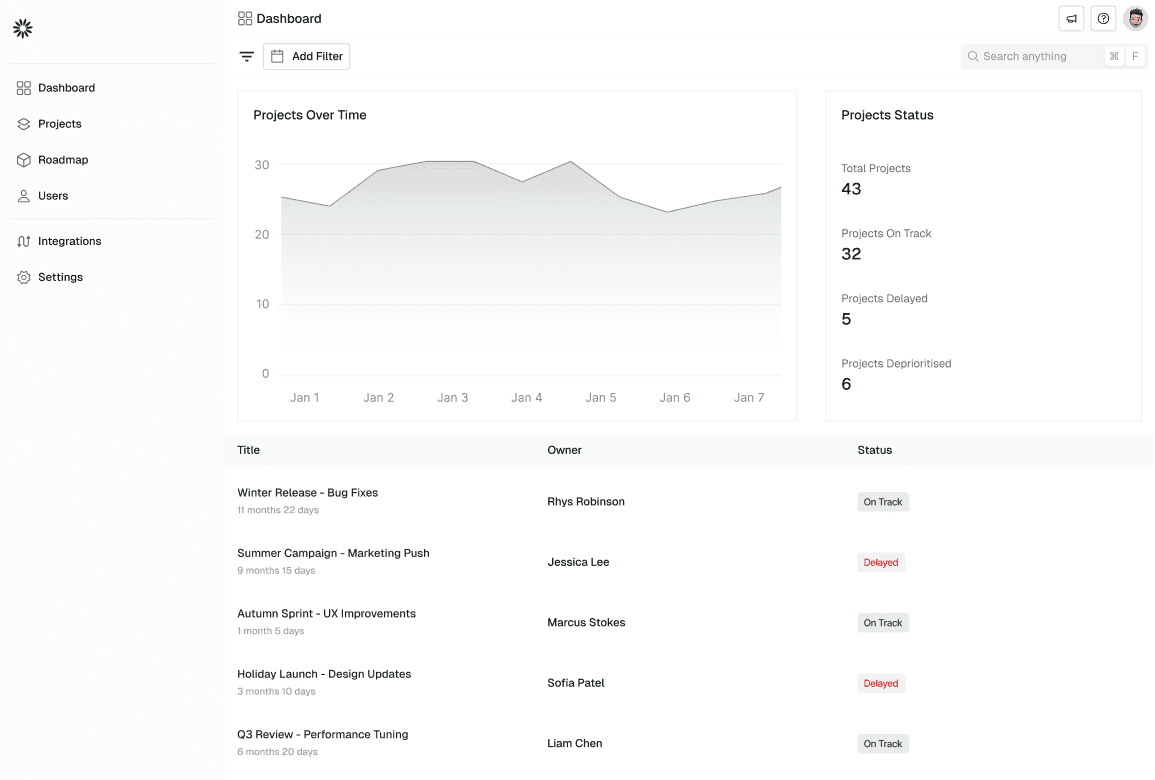
Replace Image
IMAGES FROM CHROME EXTENSION
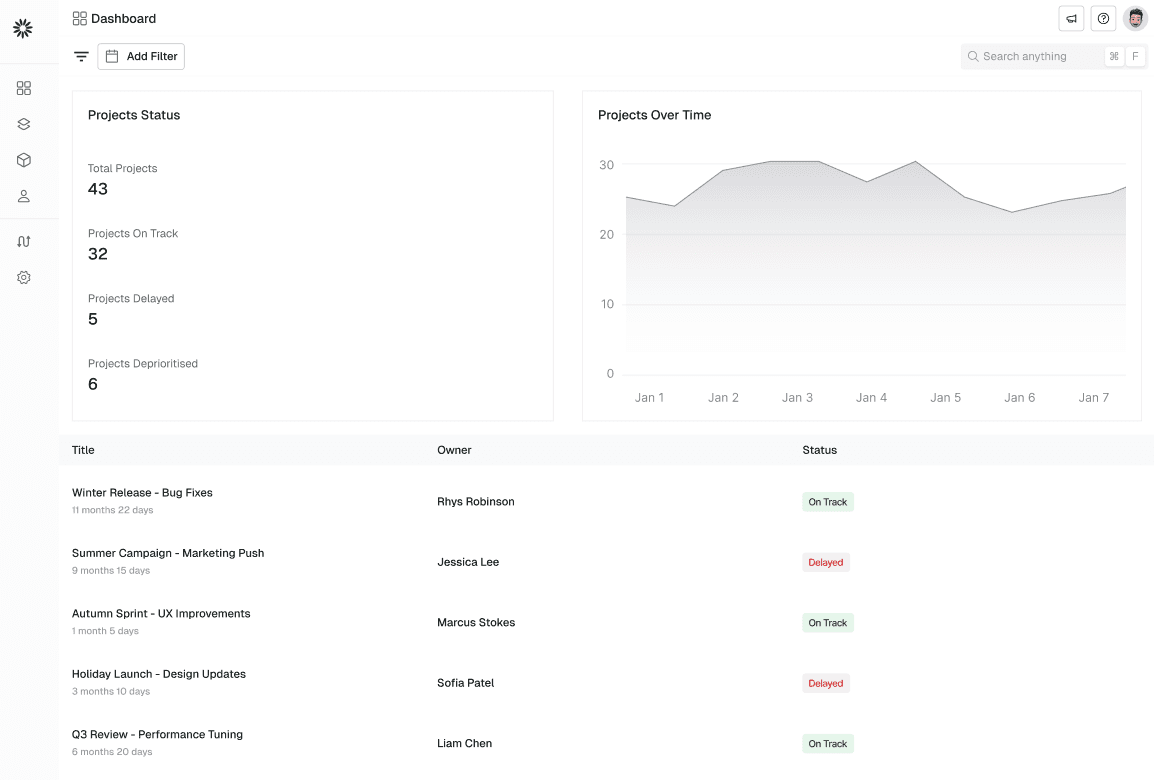
Suggests updating the dashboard image to reflect the new layout with real-time metrics, task progress, and automated insights.
Replace Image
Upload Image
Ignore
🧩 Creating a New Project
To create a new project:
Navigate to the Projects tab in the sidebar.
Click New Project.
Add a title, description, and select an owner.
Assign a due date and link any relevant issues.
Click Create Project to finish setup.
You can also select a default color to visually group projects on the roadmap.
Projects provide structure and clarity to your team’s work.
ADD TEXT
Suggests adding a new line to document the recently introduced option to assign a default color to projects for improved visual grouping on roadmaps.
Accept
Ignore
Stride helps teams plan, track, and deliver work efficiently. Projects in Stride are containers for related issues,
milestones, and cycles. Projects can be linked to roadmaps for higher-level visibility and cross-team alignment.
Remove Text
Suggests removing the outdated term “milestones,” as it’s no longer part of the project structure and has been replaced by sprints and issues.
Accept
Ignore
🗺️ Using Projects with Roadmaps
Projects can be placed directly on a roadmap to visualize timelines across teams.
This allows stakeholders to understand priorities, dependencies, and delivery expectations at a glance. Roadmaps update automatically as project dates or scopes change, ensuring alignment without manual maintenance.
👥 Collaborating Within Projects
Projects act as a shared workspace for everyone involved.
Team members can comment on project updates, adjust scope as requirements evolve, and reference related milestones during planning discussions.
This keeps conversations contextual and reduces the need for scattered updates across tools.
🗺️ Using Projects with Roadmaps
Projects can be placed directly on a roadmap to visualize timelines across teams.
This allows stakeholders to understand priorities, dependencies, and delivery expectations at a glance. Roadmaps update automatically as project dates or scopes change, ensuring alignment without manual maintenance.
Consistent Style
Updates are suggested for the most relevant articles, while respecting your style and formatting, so your content is consistently high-quality.
Product and Customer Aware Articles
Relevant articles are analysed, resolved customer support tickets are researched, and product releases captured for every new article draft or update suggestion
Make your docs AI-Ready
Content updates respect your tone, structure, and formatting so every article stays consistent and high quality
Managing Projects and Roadmaps
📊 Tracking Progress
Progress is calculated based on issue completion and milestone updates.
You can view real-time progress under each project’s overview tab.
Progress data now updates in real-time, reflecting changes instantly across all linked issues.
Replace Text
PREVIOUSLY
Progress data updates automatically every 24 hours.
Suggests rewriting the line to reflect the new real-time progress tracking behavior, replacing the outdated 24-hour sync information.
Accept
Ignore
🔔 Project Notifications
A project milestone is completed
The project state changes (Active → Completed)
A new issue is linked to your project
Replace Image
IMAGES FROM CHROME EXTENSION
Suggests updating the dashboard image to reflect the new layout with real-time metrics, task progress, and automated insights.
Replace Image
Upload Image
Ignore
🧩 Creating a New Project
To create a new project:
Navigate to the Projects tab in the sidebar.
Click New Project.
Add a title, description, and select an owner.
Assign a due date and link any relevant issues.
Click Create Project to finish setup.
You can also select a default color to visually group projects on the roadmap.
Projects provide structure and clarity to your team’s work.
ADD TEXT
Suggests adding a new line to document the recently introduced option to assign a default color to projects for improved visual grouping on roadmaps.
Accept
Ignore
Stride helps teams plan, track, and deliver work efficiently. Projects in Stride are containers for related issues,
milestones, and cycles. Projects can be linked to roadmaps for higher-level visibility and cross-team alignment.
Remove Text
Suggests removing the outdated term “milestones,” as it’s no longer part of the project structure and has been replaced by sprints and issues.
Accept
Ignore
🗺️ Using Projects with Roadmaps
Projects can be placed directly on a roadmap to visualize timelines across teams.
This allows stakeholders to understand priorities, dependencies, and delivery expectations at a glance. Roadmaps update automatically as project dates or scopes change, ensuring alignment without manual maintenance.
👥 Collaborating Within Projects
Projects act as a shared workspace for everyone involved.
Team members can comment on project updates, adjust scope as requirements evolve, and reference related milestones during planning discussions.
This keeps conversations contextual and reduces the need for scattered updates across tools.
🗺️ Using Projects with Roadmaps
Projects can be placed directly on a roadmap to visualize timelines across teams.
This allows stakeholders to understand priorities, dependencies, and delivery expectations at a glance. Roadmaps update automatically as project dates or scopes change, ensuring alignment without manual maintenance.
Managing Projects and Roadmaps
📊 Tracking Progress
Progress is calculated based on issue completion and milestone updates.
You can view real-time progress under each project’s overview tab.
Progress data now updates in real-time, reflecting changes instantly across all linked issues.
Replace Text
PREVIOUSLY
Progress data updates automatically every 24 hours.
Suggests rewriting the line to reflect the new real-time progress tracking behavior, replacing the outdated 24-hour sync information.
Accept
Ignore
🔔 Project Notifications
A project milestone is completed
The project state changes (Active → Completed)
A new issue is linked to your project
Replace Image
IMAGES FROM CHROME EXTENSION
Suggests updating the dashboard image to reflect the new layout with real-time metrics, task progress, and automated insights.
Replace Image
Upload Image
Ignore
🧩 Creating a New Project
To create a new project:
Navigate to the Projects tab in the sidebar.
Click New Project.
Add a title, description, and select an owner.
Assign a due date and link any relevant issues.
Click Create Project to finish setup.
You can also select a default color to visually group projects on the roadmap.
Projects provide structure and clarity to your team’s work.
ADD TEXT
Suggests adding a new line to document the recently introduced option to assign a default color to projects for improved visual grouping on roadmaps.
Accept
Ignore
Stride helps teams plan, track, and deliver work efficiently. Projects in Stride are containers for related issues,
milestones, and cycles. Projects can be linked to roadmaps for higher-level visibility and cross-team alignment.
Remove Text
Suggests removing the outdated term “milestones,” as it’s no longer part of the project structure and has been replaced by sprints and issues.
Accept
Ignore
🗺️ Using Projects with Roadmaps
Projects can be placed directly on a roadmap to visualize timelines across teams.
This allows stakeholders to understand priorities, dependencies, and delivery expectations at a glance. Roadmaps update automatically as project dates or scopes change, ensuring alignment without manual maintenance.
👥 Collaborating Within Projects
Projects act as a shared workspace for everyone involved.
Team members can comment on project updates, adjust scope as requirements evolve, and reference related milestones during planning discussions.
This keeps conversations contextual and reduces the need for scattered updates across tools.
🗺️ Using Projects with Roadmaps
Projects can be placed directly on a roadmap to visualize timelines across teams.
This allows stakeholders to understand priorities, dependencies, and delivery expectations at a glance. Roadmaps update automatically as project dates or scopes change, ensuring alignment without manual maintenance.
Update content where it matters
Content updates respect your tone, structure, and formatting so every article stays consistent and high quality

Add Image Description
Add Image Description
🗺️ Using Projects with Roadmaps
Projects can be placed directly on a roadmap to visualize timelines across teams.
This allows stakeholders to understand priorities, dependencies, and delivery expectations at a glance. Roadmaps update automatically as project dates or scopes change, ensuring alignment without manual maintenance.
Modern SaaS dashboard displaying real-time metrics, task progress, performance analytics, and automated insights.
Add Description
Add Description
Add Image Description
Add Image Description
🗺️ Using Projects with Roadmaps
Projects can be placed directly on a roadmap to visualize timelines across teams.
This allows stakeholders to understand priorities, dependencies, and delivery expectations at a glance. Roadmaps update automatically as project dates or scopes change, ensuring alignment without manual maintenance.
Modern SaaS dashboard displaying real-time metrics, task progress, performance analytics, and automated insights.
Add Description
Add Description
Make your docs AI-Ready
Content updates respect your tone, structure, and formatting so every article stays consistent and high quality

Write a help article explaining how team members and roles work.
Cover inviting users, roles (Admin/Editor/Viewer), changing permissions, removing members, notifications, and include a short FAQ.
Create Article
Write documentation with product awareness
Articles are created using context from your current docs and drafts to ensure accuracy, relevance, and consistency.
SYNC
Publish from one place.
Pageloop hosts your docs on your domain. Every article is versioned in Git and reviewed before it goes live. Pageloop also connects to a number of popular help centres.
Updates
Streamlined Issu…
Managing Project...
Publish to Zendesk
Managing Projects and Roadmaps
Stride helps teams plan, track, and deliver work efficiently. Projects in Stride are containers for related issues,
milestones, and cycles. Projects can be linked to roadmaps for higher-level visibility and cross-team alignment.
🔔 Project Notifications
A project milestone is completed
The project state changes (Active → Completed)
A new issue is linked to your project
📊 Tracking Progress
Progress is calculated based on issue completion and milestone updates.
You can view real-time progress under each project’s overview tab.
Progress data now updates in real-time, reflecting changes instantly across all linked issues.
Updates
9/9
Remove Text
Replace Text
Add Text
Update Text
Replace Text
Replace Image
Add Text
Replace Image
Update Text
Support Content is a
living & breathing system
The people who own your docs are experts in researching and writing.
Yet they spend 70% of their time fixing stale docs and outdated content.
We take over maintenance with sophisticated AI agents,
so you can do more of what you love.
2026 Pageloop. All rights reserved.
2026 Pageloop. All rights reserved.